While visiting my sister Joan in Florida and sitting on her patio chatting, she was working hard to remove some apps from her husband’s phone–to clean it up a bit. She blurted out “I want the Google thing.” I laughed out loud at that statement and asked her “what Google thing.” She responded, “you know the one with the “G” in the middle of it.” So I asked “what do you mean” the Google app or the Google search engine or the Google mail app. Well at that response, she said “I have no idea, just the Google thing.”
After having a good laugh with her, she exclaimed that she had no idea what she was talking about but was looking for the little square with the G on it–not the square that said Google or the square that was Google Chrome. I must insert here that my sister is one of the smartest most compassionate person I know. She has worked with cancer patients most of her adult life and has helped so many people that there is no need to forgive her for not knowing this stuff.
I thought about her dilemma for a while and about a previous conversation I had with her about urls–or which she might call the “urls thing”. Those with no background in computers or technology find it difficult to learn the ins and outs of phones and computers because the terminology is a mystery to them. And so I hope that these posts will help my sister and others who don’t have that background to learn the “basics” of computer-speak.
I thought I might do the first post about some tools and possibly, if of interest to people, dive deeper with future posts. Believe me, I am not going to dive very deep into this because I am not a computer geek or nerd, I am simply someone who was in an industry that taught me everything or in order to survive, I had to learn everything.
THE STUFF
Here are the items we will look at in this post:
- the internet
- applications
- browsers
- urls
As we walk through these items it might help to keep this in mind:

the internet is the highway
the applications are the cars
the browsers are the maps
and the urls are the destinations
THE INTERNET
Think of the internet as the highways that run through your country. It is the system of bridges, roads, tunnels and the infrastructure of the entire world. It’s an information database that allows everyone to interact with the data and share with others.
APPLICATIONS
Think of the applications as your car. It is a vehicle to get into your phone or computer to do something. Examples of applications or in phone lingo an “app” could be: weather, news, mail, photos, map, banking, shopping, hotels, airlines, food and a million other apps.
The app is the tool that companies use so that you can interact with them or others. Some are used for socializing such as Facebook, Instagram, Twitter, or banking like Citibank or Bank of America, or Grubhub where you can order food to be delivered or E-Trade where you can buy and sell stocks or brick and mortar stores who will sell their products online or Amazon where you can buy anything. YIKES! Almost every existing corporation has an “app” for your phone.
Here are some tasks you can accomplish while on your phone.
You can manage your money online so you can purchase a plane ticket and rent an AirBnB to then post your vacation pics on Instagram…..all this from your phone.
Or order food to relax and watch a movie or some videos … once again, all this from your phone.
BROWSERS AND SEARCH ENGINES
Browsers are both applications and search engines. Browsers allow you to surf the net— you search items of interest to you and various suggestions come up to provide you the information you requested. Many companies create browsers–they basically all do the same thing but when opened look different. Some have more privacy features than others. As you surf on the net for products, you are most likely tracked and so, you see ads galore for a pair of sneakers you searched and bought a week ago. Some browsers do not track and others do. I find that sometimes I want the browser that tracks me because seeing ads for those sneakers I am shopping for are useful and at other times I would rather not see ads for items I’ve searched.
Here are the 8 most popular browsers:
- Firefox
- Google Chrome
- Microsoft Edge
- Apple Safari
- Opera
- Brave
- Vivaldi
- DuckDuckgo
Browsers are apps and browsers; others are just browsers that need to be employed through other apps. Sorry, this sounds complicated but it is not really. People have interchanged the terminology, but if you understand it in the simplest terms, you are the winner.
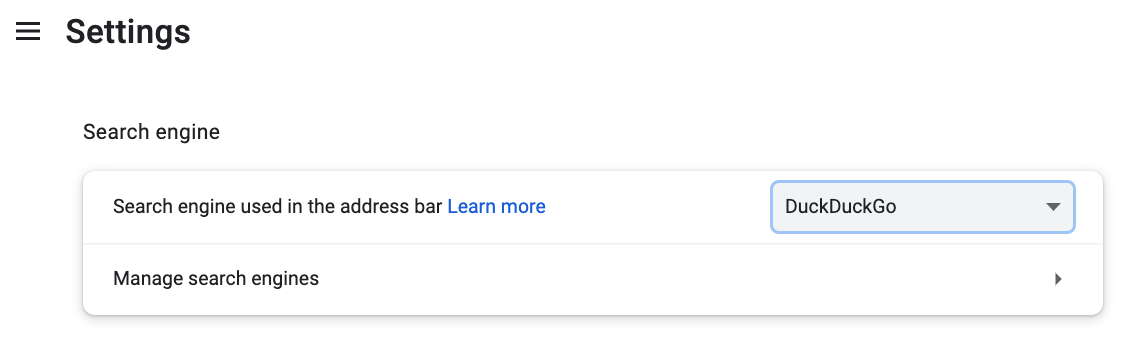
An example: you use Google Chrome or Safari as a browser but you use DuckDuckgo as the search engine in that browser. This would allow you the user friendly interface of Chrome and/or Safari and the privacy of a search engine like DuckDuckgo. [You can set up your preference for search engine within your browser app under preferences; the drop down menu allows you to choose.]

and oh, those URLS
Simply put, urls are addresses: it is your destination. The abbreviation of urls is Uniform Resource Locators–it is the location of your destination. You normally get the address [url] from a search done with the search engine.
For an example: you wish to know the times of a movie you wish to see. You know the name of the theatre and put it in the search engine. A number of possibilities come up and you choose the one closest to what you are looking for and click on that. That is the url.
The url is at the top of the browser. This is Facebook’s url. Sometimes you will see just “facebook.com” or depending on your browser settings, you will see the entire address with the “https://www”. Whatever site you are on, there will be a url in this window. So if someone said, “just type facebook.com in the url, this is the area you would input to.

MORE TO COME
There is so much more. I’m would love those reading this to comment and let me know if this is helpful and what else you want to know. Remember, as I let my sister know, you can’t break the internet.




 Fun and Other Serious Matters